Description
INSTRUCTIONS FOR USE
OF A REFRIGERATOR WITH FREEZER
Important safety warning
General information and tips
THANK YOU FOR WELCOMING OUR APPLIANCE INTO YOUR HOME
We are happy that you have chosen a Gorenje appliance. Gorenje is here to empower you and all your adventures with our cutting-edge technology and modern home appliances made of high-quality materials. Because we are working tirelessly on energy efficiency, by purchasing our appliance, you too are contributing to more sustainable future.
Please visit our website where you can enter your appliance model number, indicated on the rating plate or the warranty sheet, to find detailed description of your appliance, tips on use, troubleshooting, service information, instructions for use etc.
https://international.gorenje.com
We hope our appliance will meet and exceed your expectations.
Link to the EU EPREL database
The QR code on the energy label supplied with the appliance provides a web link to the registration of this appliance in the EU EPREL database. Keep the energy label for reference together with the user manual and all other documents provided with this appliance. It is possible to find information related to the performance of the product in the EU EPREL database using the link https://eprel.ec.europa.eu and the model name and product number that you can find on the rating plate of the appliance. For more detailed information about the energy label, visit www.theenergylabel.eu.
The appliance is intended solely for household use.
The refrigerator is intended for storing fresh food at temperatures above 0°C.
The following symbols are used throughout the manual and they have the following meanings:
Information, advice, tip, or recommendation
Warning – general danger
Warning – danger of electric shock
Warning – danger of fire
By scanning the QR code found on the rating plate or the special sticker inside the appliance, you will find more detailed instructions for use and a description of your appliance.
Important notes and precautions
Before using the appliance for the first time
Before connecting the appliance to the power mains, please read carefully the instructions for use which describe the appliance and its correct and safe use. The instructions apply to several appliance types/models; thus, settings or equipment may be described herein which is not available in your appliance. We recommend saving this instruction manual for future reference and attach it to the appliance if it is sold in the future.
Check for any damage or irregularities on your appliance. If you find your appliance is damaged, notify the retailer from which you have purchased the appliance.
Allow the appliance to stand upright for at least 4 hours before you connect the appliance to the mains. This reduces the risk of malfunctions resulting from transport effects on the refrigerant unit.
Important safety instructions
WARNING! Risk of fire/flammable materials.
The appliance must be connected to the power mains and grounded in compliance with the effective standards and regulations.
WARNING! Do not locate multiple portable socket-outlets or portable power supplies at the rear of the appliance.
Before cleaning the appliance, unplug it from the power mains (unplug the power cord from the wall outlet).
WARNING! If the supply cord is damaged, it must be replaced by the manufacturer, its service agent or similarly qualified persons in order to avoid a hazard.
WARNING! When positioning the appliance, ensure the supply cord is not trapped or damaged.
If LED lighting does not work, call a service technician. Do not attempt a repair of the LED lighting yourself, as there is danger of contact with high voltage!
WARNING! Do not use electrical appliances inside the food storage compartments of the appliance, unless they are of the type recommended by the manufacturer.
WARNING! Do not use mechanical devices or other means to accelerate the defrosting process, other than those recommended by the manufacturer.
WARNING! To avoid any hazard resulting from poor stability of the appliance, make sure it is installed as instructed.
Freeze burn hazard
To avoid freeze burn, never put frozen food in your mouth and do not touch frozen food.
Safety of children and vulnerable persons
The appliance is not intended for use by persons (including children) with reduced physical, sensory or mental capabilities, or lack of experience and knowledge, unless they have been given supervision or instruction concerning use of the appliance by a person responsible for their safety.
Children should be supervised to ensure that they do not play with the appliance.
Cleaning and user maintenance shall not be made by children without supervision.
Remove the packaging intended to protect the appliance or particular parts during transport and keep it outside the reach of children. It presents danger of injury or suffocation.
When removing a used appliance, disconnect the power cord, remove the door, and leave the shelves in the appliance. This will prevent children from locking themselves in the appliance.
For European markets only
This appliance can be used by children aged from 8 years and above and persons with reduced physical, sensory or mental capabilities or lack of experience and knowledge if they have been given supervision or instruction concerning use of the appliance in a safe way and understand the hazards involved.
Children shall not play with the appliance.
Cleaning and user maintenance shall not be made by children without supervision.
Children aged from 3 to 8 years are allowed to load and unload refrigerating appliances.
Warning regarding the refrigerant
The appliance contains a small amount of an environmentally friendly yet flammable gas R600a. Make sure that no parts of the cooling system are damaged. A gas leak is not hazardous to the environment, but it could cause eye injury or fire.
In case of a gas leak, ventilate the room thoroughly, disconnect the appliance from the power mains, and call a service technician.
Important information on the use of appliance
WARNING! This appliance is intended to be used in household and similar applications such as:
-
staff kitchen areas in shops, offices and other working environments;
-
farm houses and by clients in hotels, motels and other residential type environments;
-
bed and breakfast type environments;
-
catering and similar non-retail applications.
WARNING! Keep ventilation openings, in the appliance enclosure or in the built-in structure, clear of obstruction.
The appliance may not be used outdoors and it may not be exposed to rain.
Do not store explosive substances such as aerosol cans with a flammable propellant in this appliance.
If the appliance will be out of use for an extended period of time, switch it off using the relevant button, and unplug it from the power mains. Empty the appliance, defrost it, clean it, and leave the door ajar.
In case of an error or power supply failure, do not open the freezer compartment unless the freezer has not operated for over 16 hours. After this period, use the frozen food or provide sufficient cooling (e.g. a replacement appliance).
Technical information on the appliance
Rating plate can be found in the appliance interior. It indicates data on voltage, gross and net volume, type and amount of refrigerant, and information on the climate classes.
If the language on the rating plate is not the language of your choice or the language of your country, replace it with the one supplied.
WARNING! Do not damage the refrigerant circuit.
Installation and connection
Selecting the location
-
Place the appliance in a dry and well aired room. The permitted ambient temperature range for the appliance depends on the appliance's climate class, which is shown on the type plate.
-
Do not place the appliance near a source of heat, such as a gas cooker, radiator or boiler, etc., and do not expose it to direct sunlight.
|
|
Class |
Ambient temperature range °C |
Relative humidity |
|
Extended temperate |
SN |
+10 to +32 |
≤75% |
|
Temperate |
N |
+16 to +32 |
|
|
Subtropical |
ST |
+16 to +38 |
|
|
Tropical |
T |
+16 to +43 |
Do not place the appliance in a room where the temperature can fall below 5 °C: the appliance may not work properly or become defective!
The appliance is not suitable for outdoor use and it may not be exposed to rain.
-
The appliance must be placed at a distance of at least 5 cm from an electrical or gas cooker and at least 30 cm from a radiator or heater. An insulation panel must be fitted when these distances cannot be kept.
-
The appliance must be placed at least 5 cm away from the wall or the back of the cabinet. A kitchen cupboard above the refrigerator must have a gap of at least 5 cm between the back of the cupboard and the wall. This is needed to make sure that there is sufficient cooling air for the condenser.
-
The plug of the installed appliance must remain accessible!
Place the appliance in a room with a sufficient volume of air. The room must have a volume of at least 1 m3 of air for every 8 grams of refrigerant. The quantity of refrigerant is shown on the type plate on the inside of the appliance.
-
The kitchen unit in which the appliance is to be built in must have an opening of at least 200 cm2 in its base to allow sufficient air to circulate.
-
The appliance's air outlet is at the top. Make sure that the outlet is not blocked. Blocking the outlet can result in damage to the appliance.
When installing the appliance side-by-side into kitchen cabinets, each appliance should be integrated into a separate cabinet.
Connecting the appliance
-
Connect the appliance to the power supply with a plug. The socket must be earthed. The nominal voltage and frequency required for the appliance are shown on the appliance's type plate/label with basic information.
-
The appliance must be connected to the mains and earthed in accordance with the prevailing standards and regulations. The appliance can withstand small variations in the mains voltage to a maximum of plus or minus 6%.
When you are not going to use the appliance for a longer period then switch it off with the appropriate key and disconnect it from the mains. Empty, defrost and clean the appliance, and leave the door ajar.
Changing the side on which the door opens / building the appliance into a cupboard
Information about changing the side on which the door opens and building the appliance into a cupboard is enclosed in separate installation instructions.
Before using the appliance for the first time
Before you use the appliance for the first time
Do not connect the appliance to the mains until you have carefully read the instructions for the correct and safe use of the appliance. As these instructions are for various types and models, it is possible that the instructions for use refer to settings or parts that are not available on your appliance. We recommend that you keep these instructions for future use. If you sell the appliance, enclose them with the appliance.
Inspect the appliance for damage and/or irregularities. If the appliance is damaged, contact the store that sold you the appliance.
Allow the appliance to stand upright for at least 4 hours before you connect the appliance to the mains. This reduces the risk of malfunctions resulting from transport effects on the refrigerant unit.
Before using the appliance for the first time, the interior and all internal accessories should be cleaned with lukewarm water and a neutral cleaning agent. Wipe the cleaned parts with a cloth with clean water and then dry them thoroughly.
If you use the appliance for the first time, do not put food into the appliance until the temperature has decreased to the set temperature.
Energy-saving advice
-
Install the appliance as stated in the instructions for use.
-
Do not open the door more than necessary.
-
Never cover or obstruct the ventilation openings.
-
Replace a door seal that is damaged or no longer seals properly as quickly as possible.
-
Store food in well-sealed containers or suitable packaging.
-
Allow food to cool to room temperature before you put it in the appliance.
-
Defrost food in the refrigerator compartment.
-
Space the shelves evenly in the refrigerator compartment. Place the food so that the air can circulate freely in the appliance (follow the recommendations for the location of foods enclosed in the instructions).
-
The lower the set temperature, the higher the power consumption.
Description of the appliance
Appliance interior equipment may change according to the appliance model.
This product contains a light source of energy efficiency class G.
A Refrigerator
-
Control panel
-
Air distribution system
-
Glass shelves
-
Low-temperature drawer*
-
Fruit and vegetable drawer with humidity control*
-
Door compartments
B Freezer
-
Freezer drawers
*Only in some models
Operating the appliance
|
A |
Appliance on/off key |
|
B |
EcoMode function on/off key |
|
B1 |
EcoMode function indicator |
|
C |
Intensive cooling (super cool) on/off key |
|
C1 |
Intensive cooling (super cool) function indicator |
|
D |
Refrigerator compartment temperature setting key |
|
D1 |
Refrigerator compartment temperature display |
|
E |
Key for setting the freezer compartment temperature |
|
E1 |
Freezer compartment set temperature display |
|
F |
Intensive freezing (fast freeze) on/off key |
|
F1 |
Intensive freezing (fast freeze) function indicator |
|
G |
Alarm off key |
|
G1 |
Alarm operation indicator |
|
H |
Wi-Fi function on/off key (Only available in some models) |
|
H1 |
Wi-Fi function indicator (Only available in some models) |
|
I |
ConvertActive function on/off key |
|
I1 |
ConvertActive function indicator |
Switching the appliance on/off
To switch on the appliance press A key for 3 seconds.
Switching off the appliance: switch off the appliance by pressing the A key and holding it (for 3 seconds). The appliance will switch to standby mode (it remains powered).
Adjusting the temperature in the appliance
-
Appliance temperature is preset at the factory to the recommended setting, i.e. 4°C for the refrigerator compartment and -18°C for the freezer compartment.
-
After the appliance is switched on, it may take several hours for the set temperature to be reached. Do not place any food into the refrigerator before the temperature drops to the selected setting.
The temperature in the refrigerator compartment can be set with the D key. Press the D key until the D1 display shows the desired temperature.
-
The temperature in the refrigerator compartment can be set in the range from +2 °C to + 8 °C.
-
Each time you press the D key you reduce the setting by 1 °C. After three seconds of inactivity, the setting is automatically saved as the last set temperature of the refrigerator compartment.
-
Recommended temperature setting is 4°C.
The temperature in the freezer compartment can be set with the E key. Press the E key until the E1 display shows the desired temperature.
-
The temperature in the freezer compartment can be set in the range from -14°C to -24°C.
-
Each time you press the E key you reduce the setting by 1 °C. After three seconds of inactivity, the setting is automatically saved as the last set temperature of the freezer compartment.
-
Recommended temperature setting is -18°C.
Intensive freezing (freezer compartment)( )
)
-
Use this setting after switching on the appliance for the first time, before cleaning, or before inserting a large amount of food.
Power on: switch on the intensive freezing mode by pressing the key F. You will hear a beep, and the display will light up F1 and show -24.
Power off: switch off the intensive freezing mode by pressing F. The intensive freezing will also be deactivated if you change the set freezer compartment temperature, or activate the following function Eco.
If the setting is not deactivated manually, it will be deactivated automatically (after about 52. hours). The setting returns to the last saved state.
-
When the intensive freezing (fast freeze) function is activated, the appliance will operate with maximum power. During this time, operation may be temporarily somewhat louder.
-
When the intensive freezing (fast freeze) function is activated, temperature may be lower both in the refrigerator and the freezer compartment.
Intensive cooling (refrigerator compartment)( )
)
Use this setting after switching on the appliance for the first time, before cleaning, or before inserting a large amount of food.
Power on: switch on the intensive cooling mode by pressing C. You will hear a beep, and the display will light up C1 and show 2.
Power off: switch off the intensive cooling mode by pressing C. The intensive cooling will also be deactivated if you change the set refrigerator compartment temperature, or activate the following function Eco.
If the setting is not deactivated manually, it will be deactivated automatically (after about six hours). The setting returns to the last saved state.
EcoMode function( )
)
Power on: turn on the EcoMode function by pressing B. The display will show B1. When the EcoMode function is activated, the refrigerator compartment is set to +6 °C and the freezer compartment to -17 °C.
Power off: the EcoMode function can be switched off by pressing the B key again until the symbol B1 goes out.
The EcoMode function will also be deactivated when you change the refrigerator or freezer compartment temperature setting, or when you activate any of the other extra functions.
ConvertActive function
The entire freezer compartment can be converted into a ZeroZone compartment. Temperatures in this area are around 0 °C or slightly below 0°C. Therefore, do not store food that is sensitive to low temperature in this compartment as such food may freeze. Before switching to ZeroZone function, empty the freezer compartment to prevent the frozen food from defrosting and perishing.
-
Switching on the function ConvertActive: with a long (5 second) press of the key I. You will hear a beep, and the display I1 will light up.
-
When this function is activated, the temperature in the freezer compartment will be set to 0°C, while the refrigerator compartment temperature will be set to 4°C. "0°C" will flash on the E1 display until the temperature in the freezer compartment reaches the appropriate temperature. When this temperature is reached, the "0°C" indicator will be constantly lit.
-
Setting the temperature in the ZeroZone compartment: When the ConvertActive function is activated, you can set the temperature in the freezer compartment/ZeroZone within the range of -5 °C to +3 °C.
-
The temperatures are approximate and they depend on the temperature settings in the refrigerator compartment, environment temperature, frequency of door opening, and amount of food inserted. Setting a higher temperature in the ZeroZone compartment will also increase the temperature in the refrigerator compartment, and vice versa. Adjust the setting to the operating conditions.
-
If the bottom compartment functions as a ZeroZone, the temperatures in the refrigerator compartment can only be set in the range from +2°C to +8°C. We recommend such use only when environment temperature is between +16°C and +32°C. At higher temperatures, it is not possible to guarantee adequately low temperatures in the appliance.
-
When the ConvertActive function is activated, any other extra functions will be deactivated.
-
Switching off the function ConvertActive: by pressing the key again for a long time I. You will hear a beep and the display I1 will turn off.
Wi-Fi function (Only in some models))
You can control this device remotely with your smartphone. If the device is not connected to your home network, it functions in the same way as a conventional device.
After the first power-on, the Wi-Fi module is enabled by default, with both the Wi-Fi and Bluetooth transmitters activated.
Connecting your appliance to the application ConnectLife
ConnectLife it is a smart home platform that connects people, devices, and services. The ConnectLife application includes advanced digital services and carefree solutions that allow users to monitor and control appliances, receive notifications from a smartphone, and update software (supported features vary depending on your appliance and your region/country).
To connect your smart device, you need a home Wi-Fi network (only 2.4 GHz networks are supported) and a smartphone with the application ConnectLife.
To download the ConnectLife application, scan the QR code or search for ConnectLife in your favorite app store.
-
Install the ConnectLife application and create an account.
-
In the ConnectLife application, go to the "Add device" menu and select the appropriate type of device. Then scan the QR code (it can be found on the rating plate of the appliance; you can also enter the AUID/SN code manually).
-
The application then guides you through the entire process of connecting the appliance to your smartphone.
-
After a successful connection, the appliance can be operated remotely via the mobile application.
Do you have more questions? Visit us at www.connectlife.io or contact us at hello@connectlife.io.
Cancelling all pairings
By activating this function, the appliance will be removed from all paired app user accounts.
All stored wireless network credentials (SSID and password) will be erased from the appliance.
-
Press the keyand hold it (6 seconds) until the appliance beeps twice. The symbolstarts to flash.
-
The function will terminate automatically after successful removal of all pairings in the cloud. The symbolwill turn off.
High temperature alarm
If the temperature inside the appliance is too high, an acoustic alarm will be activated (intermittent tone) and the display will show G1.
-
Every time the appliance is switched on with the A key, there is a 24-hour delay in high temperature alarm operation. If the appliance does not reach the sufficiently low temperature in this period, the alarm will be activated.
Switching off the alarm:
-
To acknowledge and switch off the acoustic alarm, press the G key.
-
When the appliance reaches an adequate temperature, the display G1 will turn off.
Open door alarm
If the refrigerator compartment door is open for too long, an acoustic alarm (repetitive beep) will be activated.
To switch off the alarm: to switch off the alarm, close the appliance door.
To acknowledge and switch off the acoustic alarm, press the G key.
If you leave the door open for more than 10 minutes, the alarm will no longer be sounded. Appliance operation will switch to safe mode in order to provide sufficient cooling and prevent food spoilage despite the open door.
Operating the appliance
Switching the appliance on/off
Adjusting the temperature in the appliance
Intensive freezing (freezer compartment)()
Intensive cooling (refrigerator compartment)()
EcoMode function()
ConvertActive function
Wi-Fi function (Only in some models))
Connecting your appliance to the application ConnectLife
ConnectLife it is a smart home platform that connects people, devices, and services. The ConnectLife application includes advanced digital services and carefree solutions that allow users to monitor and control appliances, receive notifications from a smartphone, and update software (supported features vary depending on your appliance and your region/country).
To connect your smart device, you need a home Wi-Fi network (only 2.4 GHz networks are supported) and a smartphone with the application ConnectLife.
To download the ConnectLife application, scan the QR code or search for ConnectLife in your favorite app store.
-
Install the ConnectLife application and create an account.
-
In the ConnectLife application, go to the "Add device" menu and select the appropriate type of device. Then scan the QR code (it can be found on the rating plate of the appliance; you can also enter the AUID/SN code manually).
-
The application then guides you through the entire process of connecting the appliance to your smartphone.
-
After a successful connection, the appliance can be operated remotely via the mobile application.
Do you have more questions? Visit us at www.connectlife.io or contact us at hello@connectlife.io.
Cancelling all pairings
By activating this function, the appliance will be removed from all paired app user accounts.
-
Press the keyand hold it (6 seconds) until the appliance beeps twice. The symbolstarts to flash.
-
The function will terminate automatically after successful removal of all pairings in the cloud. The symbolwill turn off.
Alarms
Appliance interior equipment
(*Equipment depends on the model)
AdaptTech
This smart system has been designed to maintain a constant temperature in the refrigerator, regardless of how often its doors are opened. It constantly monitors the use of your refrigerator and manages the temperature to prevent possible temperature increases, thus ensuring the long-term freshness of your food and reducing energy consumption.
Air distribution system*
The advanced ventilation system evenly distributes the air and equalises the temperature throughout the entire cooling section. It also ensures optimal air circulation and the best conditions for storing your food.
Drawers*
Drawers on telescopic movable guides*
Many drawers are mounted on telescopic movable guides.
To pull the drawer out of the guides, pull it out completely. Lift the drawer at the front to remove it from the latch and then pull it out completely.
To insert the drawer into the guides, pull both guides out fully. Align the drawer with the guides and push it into the groove on the back of the guide. Then slide the drawer down at the front to latch it onto the telescopic guide.
Drawers on wheels*
-
To remove the drawer:
-
Pull out the drawer until it is blocked.
-
Lift it at the front and pull out completely.
-
Low-temperature drawer*
(Only in some models)
The compartment allows storing a wide variety of fresh food for up to three times longer than in a conventional refrigerator. The food stays fresh longer, retaining its flavour and nutrients. The temperature in this drawer depends on the temperature settings in the refrigerator compartment, ambient temperature, frequency of door opening, and amount of food placed in it.
For a temperature around 0 °C in the drawer, we recommend setting the refrigerator compartment temperature to 4 °C or lower. Temperature in the drawer may fall below 0 °C. Therefore, place the temperature-sensitive food in the upper parts of the refrigerator.
For optimum performance, the drawer should be fully closed.
-
When buying food, make sure it is fresh as this will determine the quality of the food, as well as how long it will keep in the fridge.
-
Store the food in closed containers or appropriate packaging to prevent them from emitting or receiving odours and humidity.
-
Take the food from the drawer 30 to 60 minutes before use to allow the aroma and flavour develop at room temperature.
-
Foods sensitive to low temperature that are not appropriate for storage in the drawer include the following: pineapples, avocado, bananas, olives, potatoes, eggplant, cucumbers, beans, peppers (capsicum), melons, watermelons, squash...
Fruit and vegetable drawer with automatic humidity control*(depending on the model)
-
The drawer at the bottom of the refrigerator is intended for storing fruit and vegetables. It provides humidity and prevents the food from drying out.
-
The humidity in the drawer is regulated automatically, depending on the type and amount of inserted food.
Fruit and vegetable drawer with mechanical humidity control*(depending on the model)
-
The drawer at the bottom of the refrigerator is intended for storing fruit and vegetables. It provides humidity and prevents the food from drying out. The drawer has a humidity regulator which allows setting the humidity level.
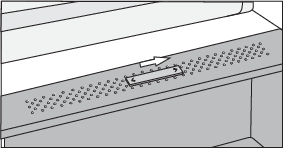
Slider position to the right: closed vents, higher humidity in the bin.
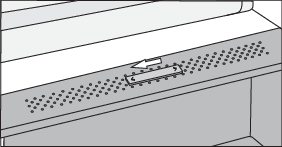
Slider position to the left: open vents, lower humidity in the bin.
If you observe droplets accumulating below the glass shelf, open the vents and wipe the shelf (see chapter TROUBLESHOOTING).
Wire bottle rack*
-
Some models also feature a wire bottle holder. It is protected against being inadvertently pulled out. It can only be pulled out when it is empty. To pull it out, lift it slightly at the rear, pull it towards you, apply some downward pressure at the front and pull the holder out of the appliance.
The holder can take a maximum load of nine 0.75-litre bottles or 13 kilograms of total weight – see label on the right side in the appliance interior.
-
Cans may also be placed on the bottle rack (lengthwise or crosswise).
Door compartments
The height of the door compartments is adjustable. Lift the compartment out of the groove and fit it in the required position. Each compartment can carry a maximum weight of 5 kg. The bottom door compartment is suitable for bottles.
MultiBox*
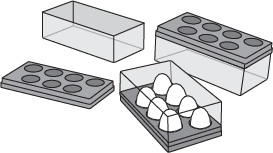
MultiBox bin offers a convenient way for storing food with a strong or pungent smell, e.g. ripened or blue-vein cheese, sausages, onions, butter etc.
If the flexible lid is used as an egg tray, place it directly on the bottom of the door bin and use the open lower part of the MultiBox bin to store food in smaller packages – pâté, jams, smaller tubes etc.
Glass shelves
Empty shelves can be rearranged as you see fit across the guides in the appliance interior. To move or remove them from the appliance, slightly lift them at the back, pull them towards you, push them down at the front and then move or pull them out of the appliance. Store quickly perishable food at the back of the shelf where the temperature is the lowest.
Ice cube tray*
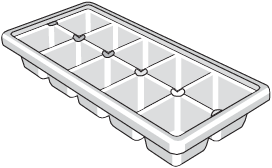
To make ice cubes, fill the tray with water and lay it horizontally in the freezer.
Recommended distribution of food in the appliance
Sections in the refrigerator compartment:
-
upper part: canned food, bread, wine, pastry ...
-
middle part: dairy products, ready-made meals, desserts, soft drinks, beer, cooked food, etc.
-
low-temperature drawer: meat, meat produce, delicatessen...
-
fruit and vegetable bin: fresh fruit, vegetables, lettuce, root vegetables, onions, garlic, sauerkraut, turnips...
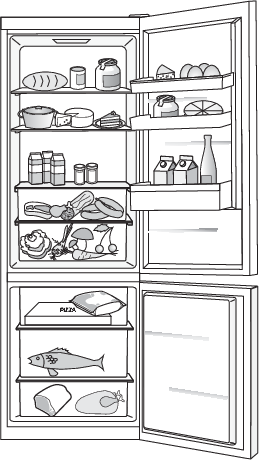
Sections in the refrigerator compartment door:
-
upper/middle door bins: eggs, butter, cheese, etc.
-
lower door bins: beverages, cans, bottles, etc.
Do not store fruit (bananas, pineapples, papaya, citruses) and vegetables (zucchini, eggplant, cucumbers, bell peppers, tomatoes, and potatoes) sensitive to low temperatures in the refrigerator.
Freezer sections:
-
freezing, storing frozen food (see chapter Freezing and storing frozen food).
Do not store the following in the freezer: lettuce, eggs, apples, pears, grapes, peaches, yoghurt, soured milk, sour cream, and mayonnaise.
Storing food in the refrigerator
Important warnings regarding food storage
Correct use of the appliance, appropriate packaging, maintaining the right temperature, and observing the food hygiene standards have a decisive impact on the quality of food storage.
Observe the expiry dates for the food, indicated on the packaging.
Food stored in the refrigerator should be kept in closed containers or in appropriate packaging to prevent it from emitting or receiving odours and humidity.
Do not store inflammable, volatile, and explosive substances in the refrigerator.
Bottles with high alcohol content should be tightly sealed and stored in an upright position.
Some organic solutions, essential oils in lemon and orange peel, butter acid, etc. may damage the plastic surfaces in case of a prolonged contact, causing damage and premature ageing of these materials.
Unpleasant odour warns of lacking cleanliness of the appliance or perished contents (see chapter Cleaning the Appliance).
If you are leaving home for a longer period of time, remove perishables from the refrigerator.
Avoid contamination of food
To avoid contamination of food, please respect the following instructions:
-
Opening the door for long periods can cause a significant increase of the temperature in the compartments of the appliance.
-
Regularly clean surfaces that can come in contact with food and accessible drainage systems.
-
Store raw meat and fish in suitable containers in the refrigerator, so that it is not in contact with or drip onto other food.
-
If the refrigerating appliance is left empty for long periods, switch off, defrost, clean, dry, and leave the door open to prevent mould developing within the appliance.
Freezing and storing frozen food
Freezing procedure
Maximum amount of fresh food that may be inserted at once is specified on the appliance rating plate. If the amount of food to be frozen exceeds the indicated amount, the quality of freezing will be inferior; in addition, the quality of the food already frozen will deteriorate.
-
Activate the super freeze function 24 hours before freezing fresh food:
-
switch on the intensive freezing mode by pressing F.
-
-
To make sure the food freezes as quickly as possible, lay out the packages as described below:
-
Pack fresh food in smaller packages (1 kg). Place four packages in the top drawer, one in each corner of the drawer, and one package in the bottom drawer, centred against the back wall.
-
Make sure the fresh food is not in contact with the food that is already frozen.
-
When freezing smaller amounts of food (1-2 kilograms), activating the super freeze function is not required.
Important warnings on freezing
Only use the freezer to freeze food appropriate for freezing. Always use quality and fresh food.
Select the most suitable packaging for the food and use the packaging correctly.
Make sure the packaging is air and water tight so that the food does not dry out and loose its vitamins.
Indicate the type of food, amount, and date of freezing on the packaging.
It is important that the food freezes quickly. Therefore, smaller packages are recommended. Refrigerate the food before freezing.
Storing industrially frozen food
-
When storing and using frozen food, observe the manufacturer's instructions. Temperature and expiry date are indicated on the packaging.
-
Only choose food with undamaged packaging, stored in freezers at temperatures of –18 °C or lower.
-
Do not purchase food covered in frost as this indicates it has been partly thawed several times and that it is of inferior quality.
-
Protect the food from thawing during transport. In case of an increase in temperature, storage time will be shorter and quality will deteriorate.
Frozen food storage time
Recommended storage time in the freezer
|
Type of food |
Storage life |
|---|---|
|
Fruit, beef |
from 10 to 12 months |
|
Vegetables, veal, poultry |
from 8 to 10 months |
|
Venison |
from 6 to 8 months |
|
Pork |
from 4 to 6 months |
|
Finely chopped or minced meat |
4 months |
|
Bread, pastas, cooked dishes, whitefish |
3 months |
|
Offal |
2 months |
|
Smoked sausage, bluefish |
1 month |
Thawing frozen food
-
Thawing is an important step in storing food preserved by freezing. Food must be thawed in the correct way.
-
Suitable methods of thawing food are:
-
in the refrigerator;
-
in cold water;
-
in a microwave or conventional oven with a suitable thaw program.
-
-
Some frozen products can be prepared without needing to thaw them first. The manufacturer will state this on the packaging.
-
The food needs to be packed in small portions. In this way the food thaws faster.
-
Use partially or completely thawed food as quickly as possible. The bacteria in thawed food are reactivated and the food will spoil rapidly. This applies in particular to fruit, vegetables and ready-made food.
-
Do not refreeze partially or completely thawed food.
Defrosting the appliance (NoFrost Dual)
The modern NoFrost Dual technology in the freezer compartment prevents the formation of ice and the accumulation of frost on foods, thus enabling economical operation, greater transparency and full use of space.
In the refrigerator compartment, it prevents food from drying out, as it maintains its humidity and freshness.
Defrosting of the refrigerator and freezer compartment is automatic, eliminating the need for time-consuming manual defrosting and cleaning.
Cleaning the appliance
Before cleaning, unplug the appliance from the power mains – switch off the appliance (see chapter Switching the Appliance On/Off) and unplug the power cord from the wall outlet.
-
Use a soft cloth to clean all surfaces. Cleaners that contain abrasive substances, acids, or solvents are not suitable for cleaning as they may damage the surface.
Clean the appliance exterior with water or a mild solution of suds.
Lacquer-coated and aluminium surfaces may be cleaned with lukewarm water to which you have added a mild detergent. Use of cleaners with low alcohol content is allowed (e.g. window cleaners). Do not use cleaners containing alcohol for cleaning plastic materials.
Appliance interior can be cleaned with lukewarm water to which you can add some vinegar.
-
Do not wash the parts of appliance interior equipment in a dishwasher as they may be damaged.
-
After cleaning, switch the appliance back on and insert the food.
Troubleshooting
|
Problem: |
Cause or remedy: |
|---|---|
|
Appliance is connected to the power mains but it does not work. |
|
|
Cooling system operates continuously for a long period of time: |
|
|
Excessive build-up of ice on the back wall of refrigerator interior can be a result of the following: |
|
|
Build-up of ice or frost in the freezer interior: |
|
|
Condensate (dew) on the shelf above the drawers: |
|
|
Droplets on the refrigerator compartment back wall. |
|
|
Water is dripping/leaking from the refrigerator: |
|
|
Door is difficult to open: |
|
|
Appliance sides are warm: |
|
|
LED lighting does not work: |
|
|
The display shows C1: |
|
|
The display shows C2: |
|
|
The display shows C3: |
|
|
Er or Ec will appear on the display unit: |
|
|
E0 will appear on the display unit: |
|
|
E1 will appear on the display unit: |
|
|
E2 will appear on the display unit: |
|
|
E3 appears on the display unit: |
|
|
E4 appears on the display unit: |
|
|
En will appear on the display unit: |
|
|
F0 will appear on the display unit: |
|
|
F1 or F2 appears on the display unit: |
|
If the above tips do not resolve your problem, call the nearest authorized service centre and state the type, model, and serial number indicated on the appliance rating plate or label located in the appliance interior.
Service
If you have encountered a problem that you cannot resolve, please contact your nearest service centre for professional help – details available at https://international.gorenje.com. Our website also has information about the availability of spare parts and what you can repair yourself.
You will need to provide the details stated on the serial number plate. Include the article number and the serial number.
Please note that non-professional repairs may pose a safety risk to the user and affect the warranty.
In European Union Member States and European Economic Area States, consumers have the right to choose, at their own discretion, between an authorized repairer and an independent repairer. However, where the consumer chooses an independent repairer, the seller and/or the manufacturer shall not be liable for any product safety risks or infringements of intellectual property rights resulting from interventions carried out by the independent repairer, nor shall they be responsible for any loss of guarantee or warranty rights arising from objective or legitimate reasons attributable to improperly performed repairs.
Right to Repair
For sales contracts concluded with consumers within European Union Member States and European Economic Area States, on or after 31 July 2026, according to the Right to Repair Directive ((EU) 2024/1799), the following consumers’ rights apply.
-
Right to choose repair
-
Extension of the legal guarantee
This information reflects the minimum level of consumer protection established by the Right to Repair Directive. EU Member States may introduce more extensive consumer rights at the national level. Where national legislation provides a higher level of protection, such national provisions shall prevail.
Additional information provided by the manufacturer is available at: https://international.gorenje.com.
Spare parts
Functional spare parts for the purchased appliance will be available for at least 10 years from the date the last unit of the model was placed on the market. During this time, original spare parts will be available to ensure the correct operation of your appliance. A list of spare parts and repair tips in accordance with the current Ecodesign Directive can be found by scanning the QR code included with the appliance. Or on the following link: https://auid.connectlife.io.
Compliance information
|
Radio equipment type: |
MWB414C.07 MWB414S.12 |
|
Wi-Fi |
|
|
Operating frequency range: |
2,412 GHz - 2,472 GHz |
|
Maximum output power: |
≤10 dBm/MHz ( EIRP) (Antenna gain 10 dBi) |
|
Maximum antenna gain: |
Gain: -1,53 dBi |
|
Bluetooth |
|
|
Frequency range: |
2,402 GHz - 2,480 GHz |
|
Carrier Output: |
4 dBm (≤10 dBm) |
|
Emission type: |
F1D |
Declaration of conformity
Declaration of conformity
The company declares that the device with the function Connectlife complies with the essential requirements and other relevant provisions of Directive 2014/53/EU. The detailed Declaration of Conformity can be found at the web address https://auid.connectlife.io on the page of your device among the additional documents.
Information about appliance noise
Cooling in refrigerators and freezers is made possible by a refrigeration system with a compressor (and, in some appliances, fans and air dampers), which also generates some noise. The intensity of noise depends on the installation, correct use and age of the appliance.
-
After the appliance is started, the compressor operation or the coolant flow during operation may be louder (buzzing, humming and liquid noises). This is not a sign of malfunction and does not affect the service life of the appliance. Over time, with the operation of the appliance, the volume of these noises decreases.
-
NoFrost appliances periodically melt ice, and there may be knocking and squeaking noises due to ice falling into the drain chute and water dripping onto the defrost heater. Cracking noises may also occur due to expansion and contraction of various components due to major temperature changes. All these sounds are normal and do not affect the service life of the appliance.
-
When closing the door, there may be a humming noise due to the pressure in the appliance equalising.
-
Sometimes, unusual or loud noises may appear during appliance operation; these are mostly the result of improper installation:
-
The appliance must stand level and stable on a solid base.
-
The appliance may not be in contact with a wall or adjacent furniture.
-
Make sure the interior equipment sits firmly in its place and that the noise is not caused by rattling cans, bottles or other containers placed next to each other.
-
-
Due to the higher workload on the cooling system when the door is opened more frequently or for a longer time, when a large amount of fresh food is introduced or when intensive freezing or cooling functions are activated, the appliance can temporarily generate more noise.
Maintenance
Environment protection
Packaging is made of environmentally friendly materials that can be recycled, disposed of, or destroyed without any hazard to the environment.
Removing an obsolete appliance
To protect the environment, take the obsolete appliance to an authorized home appliance collection centre.
Before doing so, do the following:
-
disconnect the appliance from the power mains;
-
do not allow children to play with the appliance.
 The symbol on the product or its packaging indicates that the product should not
be treated as normal household waste. The product should be taken to an authorized
collection centre for waste electric and electronic equipment processing. Correct
disposal of the product will help prevent any negative effects on the environment
and health of people which could occur in case of incorrect product removal. For detailed
information on removal and processing of the product, please contact the relevant
municipal body in charge of waste management, your waste disposal service, or the
store where you bought the product.
The symbol on the product or its packaging indicates that the product should not
be treated as normal household waste. The product should be taken to an authorized
collection centre for waste electric and electronic equipment processing. Correct
disposal of the product will help prevent any negative effects on the environment
and health of people which could occur in case of incorrect product removal. For detailed
information on removal and processing of the product, please contact the relevant
municipal body in charge of waste management, your waste disposal service, or the
store where you bought the product.
Your notes
We reserve the right to changes that do not affect the appliance functionality.